Performance Guidelines
Easy Red 2 is an open-world simulator with large maps, many active units, and complex simulation systems. These elements already consume a significant amount of performance, so it is important to follow specific standards when creating 3D models to avoid unnecessary performance issues.
GENERAL RULES
• Always use LODs when possible.
• Prefer simple Box or Sphere colliders.
• If a MeshCollider is required, use a simplified version of the mesh for collision (often an LOD mesh is sufficient).
• When using MeshColliders, enable the "Convex" option whenever the shape can be approximated without causing major issues with walking, pathfinding, or bullet collisions.
• Do not use non-convex MeshColliders on vehicles or items. They are not supported and may cause problems even when set as convex.
STANDARD POLYCOUNT (VANILLA ASSETS)
• Weapons: 5k - 12k polygons
• Vehicles: 7k - 15k polygons
• Static vehicles: 3k - 5k polygons
• Uniforms / vests: 5k - 8k polygons
• Headgear: 500 - 1k polygons
• Props: 1k - 5k polygons (depending on size)
• Buildings: 4k - 20k polygons (depending on size, presence of interiors and destructibility)
• Items / grenades: 400 - 1k polygons
• Vegetation / trees: 500 - 7k polygons (depending on usage density)
LODs should bring those poly count down to around 15%.
TEXTURES AND MATERIALS
• Textures above 2k resolution are not supported in mods.
• Use normal maps when possible, and make sure the texture type is set to "Normal Map" to avoid shading artifacts.
• If your mod is very large, consider reducing the resolution of textures used for small details.
• Use trim sheets for buildings or very large props when appropriate.
• Reuse textures and materials whenever possible.
• Avoid using many materials on a single mesh.
• If an object does not require multiple materials, use only one material per mesh.
EXPORTING FROM BLENDER
• Remove any unwanted lights, meshes, or objects before exporting.
• Cameras should never be included.
GENERAL RULES
• Always use LODs when possible.
• Prefer simple Box or Sphere colliders.
• If a MeshCollider is required, use a simplified version of the mesh for collision (often an LOD mesh is sufficient).
• When using MeshColliders, enable the "Convex" option whenever the shape can be approximated without causing major issues with walking, pathfinding, or bullet collisions.
• Do not use non-convex MeshColliders on vehicles or items. They are not supported and may cause problems even when set as convex.
STANDARD POLYCOUNT (VANILLA ASSETS)
• Weapons: 5k - 12k polygons
• Vehicles: 7k - 15k polygons
• Static vehicles: 3k - 5k polygons
• Uniforms / vests: 5k - 8k polygons
• Headgear: 500 - 1k polygons
• Props: 1k - 5k polygons (depending on size)
• Buildings: 4k - 20k polygons (depending on size, presence of interiors and destructibility)
• Items / grenades: 400 - 1k polygons
• Vegetation / trees: 500 - 7k polygons (depending on usage density)
LODs should bring those poly count down to around 15%.
TEXTURES AND MATERIALS
• Textures above 2k resolution are not supported in mods.
• Use normal maps when possible, and make sure the texture type is set to "Normal Map" to avoid shading artifacts.
• If your mod is very large, consider reducing the resolution of textures used for small details.
• Use trim sheets for buildings or very large props when appropriate.
• Reuse textures and materials whenever possible.
• Avoid using many materials on a single mesh.
• If an object does not require multiple materials, use only one material per mesh.
EXPORTING FROM BLENDER
• Remove any unwanted lights, meshes, or objects before exporting.
• Cameras should never be included.
Animation Export
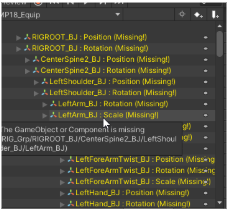
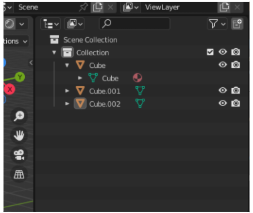
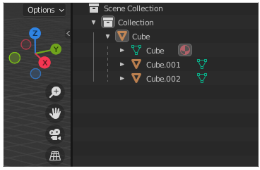
In this shown image the animation was exported with multiple objects on the root causing the animation hierarchy not to match (yellow warning text) and the path having an extra “RIG_Grp” part on the beginning.