

Generally available IDs
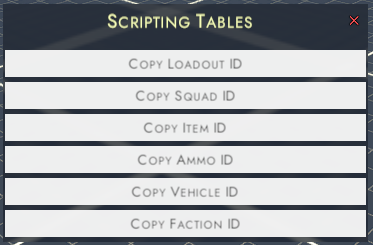
Most of the IDs can be found within the mission editor, by going to:
Left menu ➔ Scripting Menu </> ➔ ID Tables.
From here you can obtain:
• Loadout IDs (Useful for scripting)
• Squad ID (Useful for scripting)
• Item ID (Useful for scripting and vehicle/weapon modding
• Ammo ID (Useful for scripting and vehicle/weapon modding)
• Vehicle ID (Useful for scripting)
• Faction ID (Useful for scripting)
- Faction ID (useful for custom factions)
Left menu ➔ Scripting Menu </> ➔ ID Tables.
From here you can obtain:
• Loadout IDs (Useful for scripting)
• Squad ID (Useful for scripting)
• Item ID (Useful for scripting and vehicle/weapon modding
• Ammo ID (Useful for scripting and vehicle/weapon modding)
• Vehicle ID (Useful for scripting)
• Faction ID (Useful for scripting)
- Faction ID (useful for custom factions)
Ammo Types
Ammos that a weapon or a magazine can be compatible to.
Can Be aquired from the Copy Ammo ID and Copy Item ID menus.
Notice: A vehicle turret can either load ammos (Copy Ammo ID) or magazines (Copy Item ID).
Can be set in the parameters:
• GenericGun ➔ Compatible Ammo
• Magazine ➔ Compatible Ammo
• Vehicle turret ammos
Can Be aquired from the Copy Ammo ID and Copy Item ID menus.
Notice: A vehicle turret can either load ammos (Copy Ammo ID) or magazines (Copy Item ID).
Can be set in the parameters:
• GenericGun ➔ Compatible Ammo
• Magazine ➔ Compatible Ammo
• Vehicle turret ammos

Weapon TPS Animations
Package of TPS animations depending on the held weapon.
Can be set in the parameters:
• GenericGun ➔Tps Anims ➔ User Controller
Can be set in the parameters:
• GenericGun ➔Tps Anims ➔ User Controller

| Possible values | Description | Possible values | Description |
|---|---|---|---|
| CCV2_rifle | TPS Animation set for bolt action rifle | CCV2_BAR | TPS Animation set for assault rifle. |
| CCV2_rifle_ger | TPS Animation set for bolt action rifle. Use the german sprint where the rifle is held with one hand. | CCV2_bazooka | TPS Animation set for rocket launcher with back reloading. |
| CCV2_rifle_jap | TPS Animation set for bolt action rifle. Us the japanese charge sprint animation. | CCV2_garand | TPS Animation set for semi auto gun without magazine. |
| CCV2_shotgun | TPS Animation set for shotgun. | CCV2_MG | TPS Animation set for heavy MG. |
| CCV2_Bren | TPS Animation set for weapon with top magazine. | CCV2_mp40 | TPS Animation set for SMG with charging handle on the left side. |
| CCV2_stenmk2 | TPS Animation set for weapon with side magazine. | CCV2_pistol | TPS Animation set for hand gun. |
| CCV2_thompson | TPS Animation set for SMG with charging handle on the right side. | CCV2_flamethrower | TPS Animation set for flamethrowers. |
| CCV2_ATRifle | TPS Animation set for AT rifle. |
Explosion FX
Explosion FX and damage setup
Can be set in the parameters:
• ItemGrenade ➔ FPSthrowAnimation
• Scripting
(More uses to come)
Can be set in the parameters:
• ItemGrenade ➔ FPSthrowAnimation
• Scripting
(More uses to come)

| Possible values | Bundle origin | Possible values | Bundle origin |
|---|---|---|---|
| Big Water Explosion 1 | er2fxs | explosion_molotov | er2fxs |
| Big Water Explosion 2 | er2fxs | explosion_mortar | er2fxs |
| explosion_ap | er2fxs | explosion_ricochet | er2fxs |
| explosion_big | er2fxs | explosion_small | er2fxs |
| explosion_flak | er2fxs | explosion_smokegrenade | er2fxs |
| explosion_grenade | er2fxs | Explosion_vehicle_big | er2fxs |
| explosion_huge | er2fxs | SmokeArtillery | er2fxs |
| explosion_medium | er2fxs | SmokeGrenade | er2fxs |
Grenade Throw Animations
First person throw animation for grenade
Can be set in the parameters:
• ItemGrenade ➔ FPSthrowAnimation
Can be set in the parameters:
• ItemGrenade ➔ FPSthrowAnimation

| Possible values | Description | Possible values | Description |
|---|---|---|---|
| throw_grenade_1 | Throw US like grenade | throw_dynamite | Throw dynamite like grenade |
| throw_grenade_2 | Throw German like grenade | throw_molotov | |
| throw_grenade_3 | Throw Russian like grenade | throw_grenade_3_sticky | Throw No74 like grenade |
| throw_grenade_4 | Throw Egg grenade like grenade |
Vehicle seat animations
Animation sets for vehicle seat.
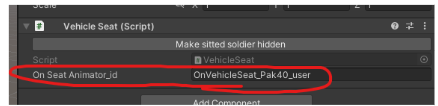
Can be set in the parameters:
• VehicleSeat ➔ OnSeatAnimator_id
Notice:
Animations marked with a Preview Pose use a new animation system designed to be reliably aligned to the transform pivot.
• For Standing animations, the pivot represents the midpoint between the feet in the idle loop pose.
• For Seated animations, the pivot represents the center point where the character sits on the seat.
Can be set in the parameters:
• VehicleSeat ➔ OnSeatAnimator_id
Notice:
Animations marked with a Preview Pose use a new animation system designed to be reliably aligned to the transform pivot.
• For Standing animations, the pivot represents the midpoint between the feet in the idle loop pose.
• For Seated animations, the pivot represents the center point where the character sits on the seat.
| Possible values | Preview pose | Possible values | Preview pose |
|---|---|---|---|
| OnVehicleSeat_Pak40_user | OnVehicleSeat_M2_Browning_Priest_EnterExitAnim | ||
| OnVehicleSeat_Pak40_secondplace | OnVehicleSeat_M2_Browning_Priest_NoLean | ||
| grayhoun_gun_user | OnVehicleSeat_MG_1 | ||
| grayhoun_mg_user | OnVehicleSeat_MG_1_NoLean | ||
| m10wolverine_gun_user | Seat_LCVP_1 | Standing | |
| mortar_reload_1 | Seat_LCVP_2 | Standing | |
| OnVehicleSeat_Glider_1 | Seat_LCVP_3 | Standing | |
| OnVehicleSeat_Glider_2 | Seat_LCVP_4 | Standing | |
| OnVehicleSeat_Glider_3 | Seat_LCVP_5 | Standing | |
| OnVehicleController_Base | Seat_LCVP_6 | Standing | |
| OnVehicleSeat_beufighter_driving | Seat_LCVP_7 | Standing | |
| OnVehicleSeat_beufighter_gunner | VCC_CarDriverFrontLeft | Sitted | |
| OnVehicleSeat_Driver | VCC_CarDriverFrontRight | Sitted | |
| OnVehicleSeat_driving | VCC_CarPassengerFrontLeft | Sitted | |
| OnVehicleSeat_sitted | VCC_CarPassengerFrontRight | Sitted | |
| OnVehicleSeat_sitted_halftrack | VCC_CarPassengerBackJeep | Sitted | |
| OnVehicleSeat_sitted_planeSmall | VCC_CarPassengerCargo_1 | Sitted | |
| OnVehicleSeat_sitted_truck | VCC_CarPassengerCargo_2 | Sitted | |
| VCC_JeepDriver | VCC_CarPassengerCargo_Weapon_1 | Sitted | |
| VCC_JeepPass | VCC_CarPassengerCargo_Weapon_2 | Sitted | |
| VCC_JeepPassBackL | VCC_CarPassengerCargoShort_1 | Sitted | |
| VCC_JeepPassBackR | VCC_CarPassengerCargoShort_2 | Sitted | |
| OnVehicleSeat_LCVP_1 | VCC_CarPassengerCargoShort_Weapon_1 | Sitted | |
| OnVehicleSeat_LCVP_2 | VCC_CarPassengerCargoShort_Weapon_2 | Sitted | |
| OnVehicleSeat_LCVP_2_l | VCC_PlaneDriver_1 | sitted | |
| OnVehicleSeat_LCVP_3 | VCC_PlaneDriver_Compressed_1 | sitted | |
| OnVehicleSeat_LCVP_4_r | VCC_NoEnterExit_Compressed_1 | Sitted | |
| OnVehicleSeat_LCVP_5 | VCC_NoEnterExit_Driver_1 | Sitted | |
| OnVehicleSeat_LCVP_6 | VCC_NoEnterExit_Passenger_1 | Sitted | |
| OnVehicleSeat_LCVP_8 | VCC_NoEnterExit_Passenger_2 | Sitted | |
| OnVehicleSeat_LCVP_9 | VCC_NoEnterExit_Passenger_Weapon_1 | Sitted | |
| OnVehicleSeat_MG_1 | VCC_NoEnterExit_Passenger_Weapon_2 | Sitted | |
| OnVehicleSeat_MG_Crouch | VCC_NoEnterExit_Plane_Driver_1 | Sitted | |
| OnVehicleSeat_MG_Crouch_2 | VCC_AT_Gunner_1 | kneel | |
| OnVehicleSeat_MG_turret | VCC_AT_Gunner_1_climb | kneel | |
| OnVehicleSeat_M2_Browning | VCC_AT_Gunner_2 | kneel | |
| OnVehicleSeat_M2_Browning_Grayhound | VCC_AT_Gunner_2_climb | kneel | |
| OnVehicleSeat_M2_Browning_Grayhound_EnterExitAnim | VCC_AT_Loader_1 | kneel | |
| OnVehicleSeat_M2_Browning_Grayhound_EnterExitAnim_NoLean |
Vehicle turret scope sprite
Sprite texture of the turret scope when aiming down sight.
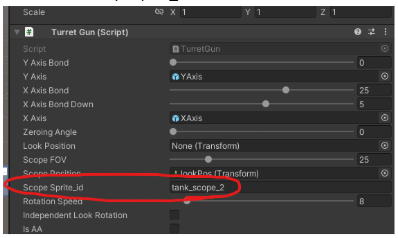
Can be set in the parameters:
• TurretGun➔ ScopeSprite_id
• TurretMG➔ ScopeSprite_id
Can be set in the parameters:
• TurretGun➔ ScopeSprite_id
• TurretMG➔ ScopeSprite_id
| Possible values | / | Possible values | / |
|---|---|---|---|
| tank_scope_1 | tank_scope_commander | ||
| tank_scope_2 | tank_scope_flak | ||
| tank_scope_3 | tank_scope_ita_1 | ||
| tank_scope_4 | tank_scope_fr1 | ||
| tank_scope_5 | tank_scope_soviet | ||
| tank_scope_6_uk | tank_scope_mg_ger | ||
| tank_scope_clear |
Turret supported magazines
Magazine ammos for a turret.
If a turret utilize a magazine, it’s likely going to me a TurretMG so it’s suggested to choose an high rate of fire for it.
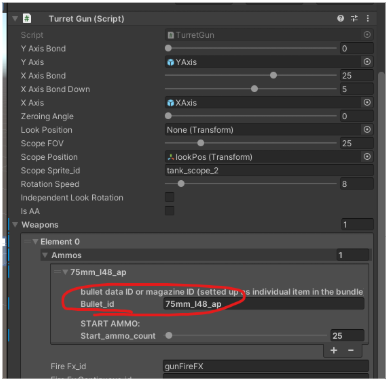
Can be set in the parameters:
• TurretGun➔ Weapons➔Ammos➔Bullet_id
• TurretMG➔ Weapons➔Ammos➔Bullet_id
If a turret utilize a magazine, it’s likely going to me a TurretMG so it’s suggested to choose an high rate of fire for it.
Can be set in the parameters:
• TurretGun➔ Weapons➔Ammos➔Bullet_id
• TurretMG➔ Weapons➔Ammos➔Bullet_id

Turret supported ammos
Individual gun bullet for a turret.
If a turret utilize an ammo like this, it’s likely going to me a TurretGun so it’s suggested to choose an low rate of fire for it.
Can be set in the parameters:
• TurretGun➔ Weapons➔Ammos➔Bullet_id
• TurretMG➔ Weapons➔Ammos➔Bullet_id
If a turret utilize an ammo like this, it’s likely going to me a TurretGun so it’s suggested to choose an low rate of fire for it.
Can be set in the parameters:
• TurretGun➔ Weapons➔Ammos➔Bullet_id
• TurretMG➔ Weapons➔Ammos➔Bullet_id
Plane Bombs (Bomb Bay)
Bomb accepted by Bomb Bay on VehiclePlane
Can be set in the parameters:
• VehiclePlane➔ BombBay➔bomb_id
Can be set in the parameters:
• VehiclePlane➔ BombBay➔bomb_id
| Values |
|---|
| PlaneBomb30 |
| PlaneBomb60 |
| PlaneBomb100 |
| PlaneBomb250 |
| PlaneBomb500 |
Add items inside vehicle inventory
You can add items inside the vehicle inventory too assigning the script InventoryManagerFiller to the root of a vehicle, and compiling it with items ID you want to add.
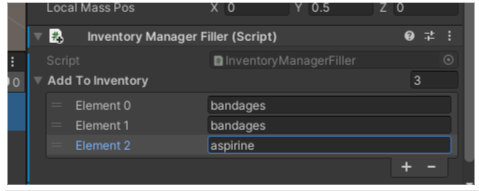
To add custom items the list you will haver to call it “<bundle name>_<item name>”.
For example l’ets say your bundle name is “custom bundle” and your item name is “my item”, the ID will be “custom bundle_my item” (Notice: it will include the spaces too if they appears in bundle or item name!)
For example l’ets say your bundle name is “custom bundle” and your item name is “my item”, the ID will be “custom bundle_my item” (Notice: it will include the spaces too if they appears in bundle or item name!)
Face IDs
ID for faction face datas
Can be set in the parameters:
• FactionDetails ➔ Faces_id
Can be set in the parameters:
• FactionDetails ➔ Faces_id
| Face ID |
|---|
| face_african_1 |
| face_african_2 |
| face_african_3 |
| face_asiatic_1 |
| face_asiatic_2 |
| face_asiatic_3 |
| face_caucasic_1 |
| face_caucasic_2 |
| face_caucasic_3 |
| face_caucasic_4 |
| face_caucasic_5 |
| face_caucasic_6 |
| face_caucasic_7 |
| face_caucasic_8 |
| face_caucasic_9 |
| face_gurkha_1 |
| face_indian_1 |
| face_indian_2 |
| face_indian_3 |
| face_sikh_1 |
| face_soviet_1 |
| face_soviet_2 |
| face_soviet_3 |
| face_soviet_4_asian |